

Appearance
.NET MAUI Integration
TIP
The anybill .NET MAUI SDK is the C# counterpart of the Android, iOS, Flutter and React Native SDKs. It targets .NET 9 with the maui-mobile workload and runs on Android (API 21+) and iOS (15+). All services are resolved through dependency injection, every call is asynchronous and returns an AnybillResult; the SDK never throws for API or network errors.
Getting Started
Packages
The SDK consists of three NuGet packages:
| Package | Target frameworks | Purpose |
|---|---|---|
Anybill.Maui | net9.0-android, net9.0-ios | MAUI integration: AddAnybill(...) registration and the platform adapters for SecureStorage, Preferences, Clipboard, DeviceInfo and the main thread |
Anybill.Sdk.Core | net9.0 | Platform-neutral core (models, HTTP pipeline, token handling, receipt cache, services). Referenced automatically by Anybill.Maui |
Anybill.Maui.Marketing | net9.0 | Optional Mobile Advertising ID (MAID) headers, see Anybill.Maui.Marketing package |
Resolving the SDK using NuGet
The anybill SDK for .NET MAUI is hosted in anybill's private NuGet repository (JFrog Artifactory), the same repository service that hosts the Android SDK. The packages are not available on nuget.org, so the anybill feed has to be added as an additional package source before they can be installed. The feed does not allow anonymous access; you can find your credentials in the provided integration documents.
| Repository | NuGet v3 URL (recommended) | NuGet v2 URL (legacy clients only) |
|---|---|---|
anybill_maui_sdk (releases) | https://anybill.jfrog.io/artifactory/api/nuget/v3/anybill_maui_sdk/index.json | https://anybill.jfrog.io/artifactory/api/nuget/anybill_maui_sdk |
anybill_maui_sdk-stg (pre-release / staging builds) | https://anybill.jfrog.io/artifactory/api/nuget/v3/anybill_maui_sdk-stg/index.json | https://anybill.jfrog.io/artifactory/api/nuget/anybill_maui_sdk-stg |
Use anybill_maui_sdk for your app. The staging repository only receives versions that are being verified before their release and may contain pre-release versions (e.g. 1.1.0-beta.1); use it only when anybill asks you to test a specific version.
To resolve the SDK, follow these steps:
- Install the .NET 9 SDK (or later) and the MAUI workload:
sh
dotnet workload install maui-mobile- Add a
nuget.confignext to your solution file. NuGet expands%VARIABLE%placeholders from environment variables, so no credentials have to be committed to source control. ThepackageSourceMappingrestricts the anybill feed to theAnybill.*packages, so every other package keeps coming from nuget.org and the feed is only contacted for the SDK:
xml
<?xml version="1.0" encoding="utf-8"?>
<configuration>
  <packageSources>
    <clear />
    <add key="nuget.org" value="https://api.nuget.org/v3/index.json" protocolVersion="3" />
    <add key="anybill" value="https://anybill.jfrog.io/artifactory/api/nuget/v3/anybill_maui_sdk/index.json" protocolVersion="3" />
  </packageSources>
  <packageSourceMapping>
    <packageSource key="nuget.org">
      <package pattern="*" />
    </packageSource>
    <packageSource key="anybill">
      <package pattern="Anybill.*" />
    </packageSource>
  </packageSourceMapping>
  <packageSourceCredentials>
    <anybill>
      <add key="Username" value="%ANYBILL_ARTIFACTORY_USER%" />
      <add key="ClearTextPassword" value="%ANYBILL_ARTIFACTORY_PASSWORD%" />
    </anybill>
  </packageSourceCredentials>
</configuration>
Alternatively register the feed once per machine with the dotnet CLI (on Linux and macOS append --store-password-in-clear-text, as the dotnet CLI cannot encrypt stored passwords there) or in Visual Studio under Tools > NuGet Package Manager > Package Manager Settings > Package Sources:
sh
dotnet nuget add source https://anybill.jfrog.io/artifactory/api/nuget/v3/anybill_maui_sdk/index.json \
  --name anybill \
  --username {username} \
--password {password_or_token}- Add the
Anybill.Mauipackage to your MAUI app project. TheAnybill.Maui.Marketingpackage is an optional add-on (see the Anybill.Maui.Marketing package section below);Anybill.Sdk.Coreis pulled in as a dependency ofAnybill.Mauiand does not have to be referenced directly.
sh
dotnet add package Anybill.Maui
# Optional
dotnet add package Anybill.Maui.Marketing
xml
<ItemGroup>
  <PackageReference Include="Anybill.Maui" Version="{latest version}" />
  <!-- Optional -->
  <PackageReference Include="Anybill.Maui.Marketing" Version="{latest version}" />
</ItemGroup>
All three packages are released together and share one version number; reference the same version of Anybill.Maui and Anybill.Maui.Marketing, as the marketing package depends on the Anybill.Sdk.Core version that Anybill.Maui pulls in. The version an app runs with is reported to anybill in the X-Anybill-SDK-Version request header (see Request headers).
Troubleshooting
- 401 Unauthorized: The credentials are missing, wrong or the token has expired. The feed cannot be accessed anonymously; check the stored username and password or token.
- NU1301 / feed not found: Make sure the URL contains
/api/nuget/v3/and ends with/index.jsonwhen it is registered as a v3 source. - NU1100 /
Anybill.Mauinot found: The feed is registered but thepackageSourceMappingdoes not routeAnybill.*to it, or the user-level and project-levelnuget.configdisagree. With<clear />in the project-level file only the sources listed there are used.
Android build warning XA4301
The SQLite native library used by the receipt cache ships libe_sqlite3.so twice, which produces the harmless warning XA4301 in Android app projects. If you build with TreatWarningsAsErrors, suppress it with <NoWarn>$(NoWarn);XA4301</NoWarn>.
Registering the SDK
Register the SDK once in MauiProgram.cs. AddAnybill adds the core services, the HTTP pipeline, the receipt cache and the MAUI implementations of the platform abstractions to the service collection.
csharp
using Anybill.Maui;
using Anybill.Sdk.Configuration;

public static MauiApp CreateMauiApp()
{
    var builder = MauiApp.CreateBuilder();
    builder.UseMauiApp<App>();

    builder.Services.AddAnybill(options =>
    {
        options.Environment = AnybillEnvironment.Production;
        options.ClientId = "{your_client_id}";
    });

    return builder.Build();
}
The options are validated once at startup; an invalid client id, a relative BaseUrl or a non-positive Timeout throws an InvalidOperationException when the app starts.
Non-MAUI .NET hosts
Anybill.Sdk.Core can be used without MAUI: call AddAnybillCore(...) (namespace Anybill.Sdk.DependencyInjection) instead of AddAnybill(...) and register your own implementations of the platform abstractions in Anybill.Sdk.Abstractions (ISecureTokenStore, IKeyValueStore, IClipboardReader, IPlatformInfo, IUiDispatcher, ISessionDataCleaner). Anybill.Maui ships these implementations for Android and iOS.
Setting the client Id
Within the provided integration documents you are going to find a Client ID. Set it as AnybillOptions.ClientId (a GUID string). It is sent as X-Anybill-SDK-ClientId with every request and used for the token refresh, which allows us to hook all of your API activity to your Client Id for analytics or support purposes later on.
csharp
builder.Services.AddAnybill(options =>
{
    options.ClientId = "{your_client_id}";
});
Change the api mode
For developing purposes you can switch the backend environment with AnybillOptions.Environment:
AnybillEnvironment | Base URL |
|---|---|
Production (default) | https://app.anybill.de/api/v4/ |
Test | https://app.test.anybill.de/api/v4/ |
Staging | https://app.stg.anybill.de/api/v4/ |
csharp
builder.Services.AddAnybill(options =>
{
    options.Environment = AnybillEnvironment.Staging;
});
Set custom base url
If your integration requires additional security, traffic control, or compliance measures—such as routing through a reverse proxy, API gateway, or similar infrastructure—you can configure the SDK to use a custom base URL for all API calls to the anybill API. Set AnybillOptions.BaseUrl to an absolute URL ending with /api/v4/; it takes precedence over Environment.
csharp
builder.Services.AddAnybill(options =>
{
    options.BaseUrl = new Uri("https://your.custom.url/api/v4/");
});
Further options
| Option | Default | Description |
|---|---|---|
Timeout | 30 seconds | Request timeout of the HTTP client |
DatabasePath | FileSystem.AppDataDirectory/anybill/receipts.db3 | Absolute path of the SQLite file used for the receipt cache |
Usage of the SDK
Resolving the services
The SDK exposes three service interfaces. Resolve them through constructor injection in your pages, view models or App class; never create implementations yourself.
| Interface | Purpose |
|---|---|
IAnybillAuthService | Token-based login, logout, user information, user deletion, user QR code, AuthStateChanged event |
IAnybillReceiptService | Cached receipt list, pagination, single receipts, favourites, notes, PDF, export, search, deletion |
IAnybillAppLinkService | Parsing of anybill app links and the deferred clipboard check |
csharp
using Anybill.Sdk.Services;

public sealed class ReceiptListViewModel
{
    private readonly IAnybillReceiptService _receipts;

    public ReceiptListViewModel(IAnybillReceiptService receipts)
    {
        _receipts = receipts;
    }
}
The public types live in the following namespaces:
| Namespace | Types |
|---|---|
Anybill.Maui | AddAnybill extension |
Anybill.Maui.Marketing | AddAnybillMarketing, DefaultMaidProvider, IMaidProvider, MaidProviderRegistry, MaidInfo |
Anybill.Sdk.Configuration | AnybillOptions, AnybillEnvironment |
Anybill.Sdk.Services | IAnybillAuthService, IAnybillReceiptService, AddReceiptResult |
Anybill.Sdk.AppLink | IAnybillAppLinkService, AnybillUrlData |
Anybill.Sdk.Auth | AuthStateChangedEventArgs, AuthStateChangeReason |
Anybill.Sdk.Models | AnybillResult, AnybillResult<T> |
Anybill.Sdk.Models.Errors | AnybillError, AnybillErrorType, AnybillErrorVariant |
Anybill.Sdk.Models.Token | TokenUser |
Anybill.Sdk.Models.User | UserInformationDto, UserQrCodeDto |
Anybill.Sdk.Models.Receipt (+ .Data, .Misc) | ReceiptDto, ContinuationReceiptList, ReceiptSearchResult, UserReceiptOrderByFieldDto and the receipt sub-models |
Anybill.Sdk.Models.Common | OrderByDirectionDto |
Anybill.Sdk.Receipts | ReceiptSearch |
Anybill.Sdk.Http.Handlers | IRequestHeaderEnricher |
Async calls and cancellation
Every SDK call is a Task and must be awaited. Methods that talk to the backend accept an optional CancellationToken as last parameter; pass the token of your page or view model to abort a pending request when the user navigates away.
csharp
var result = await _receipts.GetReceiptAsync(receiptId, cancellationToken: cts.Token);Error Handling
The anybill SDK uses a custom error handling model. All backend operations return an AnybillResult (operations without payload) or an AnybillResult<T> (operations with payload). The result either succeeds or carries an AnybillError; the SDK never throws for API or network errors. Invalid arguments (empty receipt ids, empty tokens) throw an ArgumentException instead.
csharp
public record AnybillResult
{
    public bool IsSuccess { get; }
    public AnybillError? Error { get; }                      // set when IsSuccess is false
    public int? StatusCode { get; }                          // HTTP status of the response, null when none was received
    public IReadOnlyDictionary<string, IReadOnlyList<string>> Headers { get; }
}

public sealed record AnybillResult<T> : AnybillResult
{
    public T? Data { get; }                                  // payload when IsSuccess is true
}

public sealed record AnybillError
{
    public AnybillErrorType Type { get; init; }              // top-level category, see below
    public AnybillErrorVariant Variant { get; init; }        // specific API error variant, see below
    public int Code { get; init; }                           // HTTP status code, 499 for SDK-internal errors
    public string? Title { get; init; }                      // problem details title
    public string? Message { get; init; }                    // human readable description
    public string? TraceId { get; init; }                    // trace id of the failed request
    public IReadOnlyList<string>? ReceiptIds { get; init; }  // receipts affected by a partially failed batch deletion
}
AnybillError.Type tells you which kind of error occurred:
AnybillErrorType | Meaning |
|---|---|
GenericError | The API responded with a non-success status code (see Code) or the response could not be parsed |
NetworkError | The request could not be sent or no response was received (timeout, no connectivity); Code is 0 |
InvalidRefreshTokenError | The refresh token was rejected by the API; the user has been logged out locally (see Authenticate User) |
NoUserError | No user is logged in; the operation requires an authenticated user (Code is 401) |
Unknown | An unexpected error occurred inside the SDK (Code is 499) |
AnybillError.Variant identifies specific API errors:
AnybillErrorVariant | API code | Meaning |
|---|---|---|
Default | Default | No specific variant |
DeleteReceiptsError | receipts-delete-failed | Batch deletion partially or fully failed, see ReceiptIds |
InvalidDateRange | invalid-date-range | fromDate is after toDate |
Example usage of the error model based on the user info method of the IAnybillAuthService:
csharp
var result = await _auth.GetUserAsync();

if (result.IsSuccess)
{
    var user = result.Data; // UserInformationDto
}
else
{
    switch (result.Error!.Type)
    {
        case AnybillErrorType.NetworkError:
            // Network error handling
            break;
        case AnybillErrorType.InvalidRefreshTokenError:
            // Re-authenticate the user with new tokens from your backend
            break;
        case AnybillErrorType.NoUserError:
            // No user is logged in
            break;
        default:
            // result.Error.Code (HTTP status), result.Error.Message
            break;
    }
}Push Notification
WARNING
Due to increasing restrictions of Firebase allowing secondary projects in mobile application, we do recommend implementing our receipt webhook instead. The webhook will notify you in real time about a new receipt for a user, allowing you to trigger the Push Notification from your system.
Anybill App Link
The anybill SDK supports deep linking into your app from the anybill receipt website. The deep link either opens the app directly (if installed) or persists the data over an app installation. You can utilize this feature to redirect users to your app, acquire new users and add the receipt from the receipt website to an account.
anybill app links have the form https://applink.anybill.de/...?action=addbill&link={getmy url}. The SDK parses the link, extracts the receipt id (plus the optional vendorCustomerId and isSelfGenerated flags) and caches the result until your app has processed it, so that a link opened before the user logged in can be handled after the login.
To enable anybill AppLink, follow these steps:
Acquire the Applink URL provided by anybill with your unique path pattern by contacting us beforehand.
Register the host on both platforms so the operating system opens your app for
https://applink.anybill.delinks.
Android – declare an intent filter on your MainActivity and provide anybill with the Digital Asset Links file generated by the Android Link Assistant (for your debug and release signing keys):
csharp
// Platforms/Android/MainActivity.cs
[Activity(Theme = "@style/Maui.SplashTheme", MainLauncher = true, LaunchMode = LaunchMode.SingleTop)]
[IntentFilter(
    [Intent.ActionView],
    Categories = [Intent.CategoryDefault, Intent.CategoryBrowsable],
    DataScheme = "https",
    DataHost = "applink.anybill.de",
    DataPathPattern = "/{your_path_pattern}",
    AutoVerify = true)]
public class MainActivity : MauiAppCompatActivity
{
    protected override void OnCreate(Bundle? savedInstanceState)
    {
        base.OnCreate(savedInstanceState);
        HandleAppLink(Intent);
    }

    protected override void OnNewIntent(Intent? intent)
    {
        base.OnNewIntent(intent);
        HandleAppLink(intent);
    }

    private static void HandleAppLink(Intent? intent)
    {
        if (intent?.Action == Intent.ActionView
            && intent.DataString is { } url
            && Uri.TryCreate(url, UriKind.Absolute, out var uri))
        {
            Microsoft.Maui.Controls.Application.Current?.SendOnAppLinkRequestReceived(uri);
        }
    }
}
iOS – enable the 'Associated Domains' capability with the domain applinks:applink.anybill.de in your Entitlements.plist. Additionally the bundle identifier of your application has to be in the apple-app-site-association file of our server hosting the app link web page (if that is not the case please contact us). Forward universal links to MAUI in the AppDelegate:
xml
<!-- Platforms/iOS/Entitlements.plist -->
<key>com.apple.developer.associated-domains</key>
<array>
  <string>applinks:applink.anybill.de</string>
</array>
csharp
// Platforms/iOS/AppDelegate.cs
public override bool ContinueUserActivity(UIApplication application, NSUserActivity userActivity, UIApplicationRestorationHandler completionHandler)
{
    if (userActivity.ActivityType == NSUserActivityType.BrowsingWeb
        && userActivity.WebPageUrl?.AbsoluteString is { } url
        && Uri.TryCreate(url, UriKind.Absolute, out var uri))
    {
        Microsoft.Maui.Controls.Application.Current?.SendOnAppLinkRequestReceived(uri);
        return true;
    }

    return base.ContinueUserActivity(application, userActivity, completionHandler);
}- Hand the incoming URL to the SDK in
App.OnAppLinkRequestReceived.CheckForAnybillAppLinkAsyncreturns anAnybillUrlDatawhen the URL is an anybill "add receipt" link andnullotherwise (different host, different action, missinglinkparameter or no valid receipt id).
csharp
// App.xaml.cs
public partial class App : Application
{
    private readonly IAnybillAppLinkService _appLinks;

    public App(IAnybillAppLinkService appLinks)
    {
        InitializeComponent();
        _appLinks = appLinks;
    }

    protected override async void OnAppLinkRequestReceived(Uri uri)
    {
        base.OnAppLinkRequestReceived(uri);

        var data = await _appLinks.CheckForAnybillAppLinkAsync(uri.ToString());
        if (data is not null)
        {
            // data.ReceiptId, data.VendorCustomerId, data.IsSelfGenerated
            // The data is cached by the SDK until ClearCachedAppLinkDataAsync() is called.
        }
    }
}- On the very first launch after the installation, check the clipboard once for a deferred app link (the receipt website copies the link before redirecting the user to the store).
CheckForAnybillAppLinkDataAsynconly reads the clipboard on the first launch; later calls returnnullwithout touching it.
csharp
protected override async void OnStart()
{
    base.OnStart();

    var deferred = await _appLinks.CheckForAnybillAppLinkDataAsync();
    if (deferred is not null)
    {
        // Receipt found in the clipboard, cached by the SDK
    }
}- After the user is logged in, consume the cached data, add the receipt and clear the cache:
csharp
var cached = await _appLinks.GetCachedAppLinkDataAsync();
if (cached is not null)
{
    var added = await _receipts.AddReceiptAsync(cached.ReceiptId);
    if (added.IsSuccess)
    {
        await _appLinks.ClearCachedAppLinkDataAsync();
    }
}Authentication
The IAnybillAuthService manages user authentication and token storage.
Authentication Overview
The anybill SDK handles authentication seamlessly within its internal processes. Once a user successfully authenticates, an Access Token and a Refresh Token are securely stored in the device's secure storage (Keystore on Android, Keychain on iOS):
- Access Token: Valid for 24 hours and used to authorize user requests to the anybill API.
- Refresh Token: Valid for 90 days and used to renew the Access Token upon expiration. When the Refresh Token expires, the user will need to reauthenticate.
Tokens are refreshed automatically: proactively once the ExpiresIn period of the login has elapsed and reactively on an HTTP 401 response (exactly one retry; concurrent requests share a single refresh). This automated process minimizes the need for manual token handling, ensuring a smooth and secure experience for both users and developers.
Integration with Loyalty Card and Payment Card Services
For integrations involving receipt retrieval by loyalty card or payment card, you will need to create users and obtain tokens via the Partner Platform API. These tokens can then be used to initialize the anybill SDK, enabling receipt functionality tied to specific loyalty or payment card details. For detailed instructions, refer to the Partner Platform API documentation.
Authenticate User
The .NET MAUI SDK supports the Token-Based Login only: use token information obtained from the Partner Platform API to authenticate the user without requiring credentials.
- Get a token from the anybill Partner Platform API by linking your account system to an anybill id.
- Create a
TokenUserwith the received token information. - Log the
TokenUserin with the anybill SDK.
csharp
public sealed record TokenUser(string AccessToken, string RefreshToken, string ExpiresIn);LoginWithTokenAsync clears all local data of a previous user, stores the tokens and validates them against the backend. On a validation failure (for example 401 for an invalid access token) the tokens stay stored, except when the backend rejected the refresh token, which clears the session automatically.
csharp
public async Task LoginAnybillUserAsync()
{
    var token = await YourApi.GetTokenForUserAsync();
    var tokenUser = new TokenUser(token.AccessToken, token.RefreshToken, token.ExpiresIn);

    var result = await _auth.LoginWithTokenAsync(tokenUser);
    if (result.IsSuccess)
    {
        // Logged in
    }
    else
    {
        // result.Error.Type: GenericError (e.g. Code 401), InvalidRefreshTokenError or NetworkError
    }
}
TIP
When using the Token Based Login you'll have to check for a failing Refresh Token Call on the first anybill API Call you invoke. When the error is triggered you'll have to retrieve new authentication information from the anybill Partner Platform API.
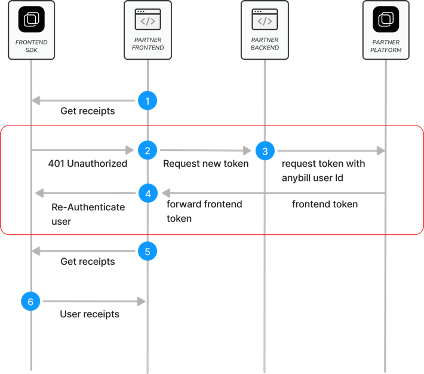
A rejected refresh token is reported in two ways: the failing call returns an AnybillError with Type == AnybillErrorType.InvalidRefreshTokenError, and the AuthStateChanged event is raised with IsLoggedIn == false and Reason == AuthStateChangeReason.InvalidRefreshToken. Subscribe to the event once, for example in your App class, to navigate back to your login flow:
csharp
_auth.AuthStateChanged += (_, e) =>
{
    // e.IsLoggedIn: login state after the change
    // e.Reason: Login, Logout, InvalidRefreshToken or UserDeleted
    if (!e.IsLoggedIn)
    {
        MainThread.BeginInvokeOnMainThread(() => Shell.Current.GoToAsync("//login"));
    }
};
TIP
If the token refresh process fails, the SDK automatically logs the user out, assuming that their authentication session has expired. Subsequent API calls will return an AnybillError with Type == AnybillErrorType.NoUserError, indicating the absence of an authenticated user session.
We recommend calling GetUserAsync() during your app's initialization phase to verify the presence of a valid authenticated session. IsLoggedInAsync() only tells you whether tokens are stored locally; it does not validate them against the backend.
Important Note: We strongly advise against re-fetching the authentication token from our Partner Platform API on every app launch. Doing so can generate excessive network traffic, negating the performance benefits provided by the mobile SDK's token caching and session management capabilities.
Retrieve User Information
Once a user is authenticated, you can retrieve information about the anybill user using the anybill SDK. The UserInformationDto model provides the following parameters:
csharp
public sealed record UserInformationDto
{
    /// The internal anybill ID of the user.
    public Guid Id { get; init; }

    /// The email of the anybill user. If you are using Token-Based Login,
    /// this email is auto-generated during user creation and does not represent a
    /// valid email address.
    public string? Email { get; init; }

    /// A flag indicating if the user is anonymous
    /// (i.e., credentials are not known to end user).
    public bool IsAnonymous { get; init; }

    /// The external ID used during the creation of the user in the Partner Platform API.
    /// In Token-Based Login, this parameter represents your userId, customerId, or customerCard.
    /// This identifier is used to recognize the user at the POS and to assign receipts to them.
    public string? ExternalId { get; init; }

    /// Notification configuration for the user. Currently, only email notifications are supported.
    public NotificationConfigurationDto? NotificationConfiguration { get; init; }
}
GetUserAsync
Retrieves the complete user model from the API (GET user).
csharp
var result = await _auth.GetUserAsync();
if (result.IsSuccess)
{
    var user = result.Data; // UserInformationDto
}
GetUserQrCodeAsync
GetUserQrCodeAsync() retrieves the data of the user's personal anybill QR code, which can be displayed at the point of sale to assign receipts to the user. The returned UserQrCodeDto contains the UserId and the list of Actions encoded in the code (currently UserQrCodeActionsDto.AnybillAddBill).
csharp
var result = await _auth.GetUserQrCodeAsync();
if (result.IsSuccess)
{
    var qrCode = result.Data; // qrCode.UserId, qrCode.Actions
}Logout and account deletion
Logging out a user deletes all of the user's app data including cached receipts, authentication information and pagination state of the anybill SDK. The logout is local only; no backend call is made. The AuthStateChanged event is raised with Reason == AuthStateChangeReason.Logout.
csharp
await _auth.LogoutAsync();Delete user
DeleteUserAsync() deletes the currently logged in anybill user on the server (DELETE user) and clears the local session on success. Possible errors are NoUserError (no user logged in), InvalidRefreshTokenError, GenericError and NetworkError.
WARNING
Do not call this method if you are creating the users in your backend via the Partner Platform API. The user has to be deleted through the Partner Platform API in that case.
csharp
var result = await _auth.DeleteUserAsync();
if (result.IsSuccess)
{
    // User deleted, local session cleared
}Receipts
The IAnybillReceiptService grants access to the anybill receipt functions. All methods require a logged in user and fail with NoUserError otherwise.
Retrieving receipts
The anybill SDK offers two distinct approaches for fetching user receipts:
Direct API Access: Use the
GetReceiptsAsync()method to directly access the API. This approach allows you to implement custom fetching and pagination logic based on your specific requirements.Optimized SDK Caching Process: Leverage the SDK's built-in caching and optimized pagination for efficient receipt retrieval by using the
InitiateReceiptQueryAsync()andContinueReceiptQueryAsync()methods in combination with the exposed observable receipt collection. This approach simplifies the retrieval process and reduces the need for manual pagination handling.
Detailed information about both approaches is provided below:
Direct API Access
The GetReceiptsAsync() method allows you to retrieve user receipts with pagination support without touching the local cache. The result includes the receipts, the total count of available receipts, and a continuation token that can be used to fetch subsequent batches.
You can customize the request with the following parameters:
take: Specifies the number of receipts to fetch in each batch. The default and maximum value is 100.
orderBy: Specifies the field used for ordering the receipts. Currently, only
UserReceiptOrderByFieldDto.Dateis available.orderDirection: Defines the sort direction for the receipts, either
OrderByDirectionDto.AscendingorOrderByDirectionDto.Descending.continuationToken: A nullable token used for paginating through the query results. If
null, a new query is initiated. To continue fetching from the previous result, use theContinuationTokenprovided in the last response.fromDate / toDate: Optional
DateTimeOffsetbounds restricting the query to receipts issued in the given time range (inclusive). AfromDateaftertoDatefails withAnybillErrorVariant.InvalidDateRange.
csharp
Task<AnybillResult<ContinuationReceiptList>> GetReceiptsAsync(
    int take = 100,
    UserReceiptOrderByFieldDto orderBy = UserReceiptOrderByFieldDto.Date,
    OrderByDirectionDto orderDirection = OrderByDirectionDto.Descending,
    string? continuationToken = null,
    DateTimeOffset? fromDate = null,
    DateTimeOffset? toDate = null,
    CancellationToken cancellationToken = default);

public sealed record ContinuationReceiptList(
    IReadOnlyList<ReceiptDto> Receipts,
    string? ContinuationToken = null,   // null when there are no further pages
    int TotalCount = 0);                // total number of receipts matching the query
TIP
Important:
Pass the same orderBy and orderDirection parameters for every page of the query, and reset the continuationToken if you modify any query parameters.
Example implementation in a view model:
csharp
private readonly List<ReceiptDto> _receiptList = new();
private string? _continuationToken;

// Initiate query without continuation token
public async Task GetFirstPageAsync()
{
    var result = await _receipts.GetReceiptsAsync(
        take: 100,
        orderBy: UserReceiptOrderByFieldDto.Date,
        orderDirection: OrderByDirectionDto.Descending);

    HandleContinuationResult(result);
}

// Continue query with continuation token
public async Task GetNextPageAsync()
{
    var result = await _receipts.GetReceiptsAsync(
        take: 100,
        orderBy: UserReceiptOrderByFieldDto.Date,
        orderDirection: OrderByDirectionDto.Descending,
        continuationToken: _continuationToken);

    HandleContinuationResult(result);
}

private void HandleContinuationResult(AnybillResult<ContinuationReceiptList> result)
{
    if (!result.IsSuccess)
    {
        // Error handling, see result.Error
        return;
    }

    // Add result.Data.Receipts to the displayed list
    _receiptList.AddRange(result.Data!.Receipts);

    // null: no more receipts to fetch; otherwise use it in the next request
    _continuationToken = result.Data.ContinuationToken;
}
Retrieving a single receipt
GetReceiptAsync(receiptId, useCache) fetches one receipt by its id (GET receipt/{id}); a fetched receipt is written to the cache. With useCache = true the local cache is queried first and the API is only called when the receipt is not cached yet (default false). A receipt that does not belong to the user fails with HTTP 404 in Error.Code.
csharp
var result = await _receipts.GetReceiptAsync(receiptId, useCache: true);
if (result.IsSuccess)
{
    var receipt = result.Data; // ReceiptDto
}Optimized SDK Caching Process
The anybill SDK offers an optimized receipt pagination process with automatic caching, providing efficient querying and display of receipts. This feature stores receipts in a local SQLite database, allowing for quicker access and better performance. Receipt actions such as deletion, edits, or marking receipts as favorites are automatically updated in the cached receipt list, making it easy to integrate receipt-related features without manual updates to the displayed list.
To enable this, the IAnybillReceiptService exposes Receipts, a ReadOnlyObservableCollection<ReceiptDto> which represents a live, up-to-date view of the cached receipts, sorted by receipt date in the direction of the last initiated query. Collection change notifications are raised on the main thread, so the collection can be bound directly to a CollectionView. The InitiateReceiptQueryAsync and ContinueReceiptQueryAsync methods allow you to refresh or extend the receipt list with new data as needed.
Similar to direct API access, you can customize the query with the following parameters:
- take: Specifies the number of receipts to retrieve in each batch, with a maximum of 100 by default.
- orderBy: Specifies the field for ordering receipts. Currently, only
UserReceiptOrderByFieldDto.Dateis supported. - orderDirection: Defines the sort direction for receipts, either
AscendingorDescending. - fromDate / toDate: Optional
DateTimeOffsetbounds restricting the query to a time range. The range is stored with the query and re-applied automatically byContinueReceiptQueryAsync().
TIP
Note on Pagination and Sorting
The continuation token and query management are handled internally by the SDK and persisted across app restarts, so there is no need for manual handling to load additional pages. However, you can check if further pages are available by evaluating whether ContinuationReceiptList.ContinuationToken == null.
If you wish to change the sorting or direction of the receipt list, use the InitiateReceiptQueryAsync() method again. This will reset the locally cached receipts and update the Receipts collection accordingly.
Load the cache
InitializeAsync() loads the cached receipts from disk so that Receipts is populated. Without calling an API you can already display these receipts to quickly provide information to the end user. The method is called implicitly by all other receipt methods, so calling it yourself is optional but recommended before the list is shown for the first time.
csharp
public sealed class ReceiptListViewModel
{
    private readonly IAnybillReceiptService _receipts;

    // Bind CollectionView.ItemsSource to this property
    public ReadOnlyObservableCollection<ReceiptDto> Receipts => _receipts.Receipts;

    public ReceiptListViewModel(IAnybillReceiptService receipts)
    {
        _receipts = receipts;
    }

    public Task LoadCacheAsync() => _receipts.InitializeAsync();
}
Fetch first page / Update receipt list
The InitiateReceiptQueryAsync method resets any existing query, clears the cache and stores the newly fetched first page in the local database. We recommend calling this method in the following scenarios to ensure an up-to-date receipt list:
Initial Display of Receipt List When the receipt list is displayed for the first time in a session (e.g., when the user navigates to the receipt list view), this method should be called to display the latest receipt data. Note that this call is unnecessary after actions such as editing, deleting, or marking a receipt as favorite, as these are automatically handled within the SDK.
New Receipt Received If a new receipt is issued while the user is in the app, the list should be refreshed upon notification of the new receipt (e.g., triggered by a webhook event). This ensures the receipt list reflects the latest transactions.
Manual User Update For scenarios where a user manually refreshes the list, such as through a "pull-to-refresh" gesture or a refresh button, use this method to re-fetch the latest data for the first page.
Change in Sort Order When changing the sorting parameters of the receipt list (e.g., switching the sort order), call this method with the new parameters. This will reset the cache to reflect the updated sorting criteria.
WARNING
Cache Reset Consideration
As this method resets the cache and fills it with a new first page, any previously cached pages will be cleared and must be re-fetched. Avoid calling this method when navigating back to the receipt list from a single receipt view to prevent unnecessary reloading.
csharp
public bool IsLastPage { get; private set; }

public async Task InitiateReceiptQueryAsync()
{
    var result = await _receipts.InitiateReceiptQueryAsync(
        take: 100,
        orderBy: UserReceiptOrderByFieldDto.Date,
        orderDirection: OrderByDirectionDto.Descending);

    if (result.IsSuccess)
    {
        // The Receipts collection is updated automatically. You do not need to use the receipts of the result.

        // Check if a next page is available
        IsLastPage = result.Data!.ContinuationToken is null;
    }
    else
    {
        // Error handling, see result.Error
    }
}
Fetch next page
To retrieve the next batch of receipts in the existing query, use ContinueReceiptQueryAsync(). This method automatically applies the previously stored continuation token, order and date range to fetch the subsequent set of receipts, seamlessly updating both the cached receipt list and the Receipts collection. When the query is already finished, an empty page is returned without a network call; when no query was initiated yet, the first page is fetched with the default parameters.
csharp
public bool IsLoading { get; private set; }

public async Task ContinueReceiptQueryAsync()
{
    if (IsLoading || IsLastPage)
    {
        return;
    }

    IsLoading = true;
    var result = await _receipts.ContinueReceiptQueryAsync(take: 100);
    IsLoading = false;

    if (result.IsSuccess)
    {
        // The Receipts collection is updated automatically.
        IsLastPage = result.Data!.ContinuationToken is null;
    }
    else
    {
        // Error handling, see result.Error
    }
}
To easily combine the caching function with filtering and querying of the receipts we recommend displaying the receipts in one unified list and not implementing actual pages with this method. To automatically fetch new receipts when the user scrolls to the end of the list, use the RemainingItemsThreshold of the CollectionView:
xml
<CollectionView ItemsSource="{Binding Receipts}"
                RemainingItemsThreshold="10"
                RemainingItemsThresholdReachedCommand="{Binding LoadMoreCommand}">
    <CollectionView.ItemTemplate>
        <DataTemplate x:DataType="models:ReceiptDto">
            <Grid Padding="16">
                <Label Text="{Binding Head.Seller.Name}" />
                <Label Text="{Binding Data.FullAmountInclVat, StringFormat='{0:N2}'}" HorizontalOptions="End" />
            </Grid>
        </DataTemplate>
    </CollectionView.ItemTemplate>
</CollectionView>
csharp
public ICommand LoadMoreCommand => new Command(async () => await ContinueReceiptQueryAsync());We recommend implementing a loading indicator while fetching pages to improve the user experience and prevent simultaneous API calls.
Marking Receipts
The anybill SDK provides following methods to edit or mark receipts:
Mark a receipt as favourite
Allowing to mark a receipt as favourite toggling the receipt.Misc.IsFavourite flag.
csharp
public async Task ToggleFavouriteAsync(ReceiptDto receipt)
{
    var result = await _receipts.ToggleIsFavouriteAsync(receipt.Id.ToString());
    if (result.IsSuccess)
    {
        // Update your displayed receipt if you are on a single receipt view
        Receipt = result.Data;
    }
}
Set custom note for receipt
Using the UpdateReceiptNoteAsync(receiptId, note) method, a custom note (max. 1024 characters) can be set for a receipt which can be retrieved in the receipt.Misc.Note field. Pass null to remove an existing note. This field can later on be used for querying and filtering the receipt list.
csharp
public async Task SetNoteAsync(ReceiptDto receipt, string? note)
{
    var result = await _receipts.UpdateReceiptNoteAsync(receipt.Id.ToString(), note);
    if (result.IsSuccess)
    {
        // Update your displayed receipt if you are on a single receipt view
        Receipt = result.Data;
    }
}
TIP
When implementing with the Optimized SDK Caching Process of the SDK, the receipt list does not have to be updated when editing the receipt. This is handled internally in the SDK.
Filtering receipt list
The anybill SDK delivers receipts as structured data, enabling you to filter by any receipt field seamlessly. When using the recommended optimized SDK caching process combined with a unified receipt list, filters are applied to the cached receipts without any API call.
Common use cases include filtering the receipt list for favorites or searching for specific string values.
For an easy query of the receipt list the anybill SDK provides the static ReceiptSearch.Filter(receipts, query) method. It returns the receipts whose seller name, seller address, total amount, note, line texts or discount names contain the query (case-insensitive). As this method is performance costing on large caches, we do recommend checking for a min length of the keyword (e.g. > 3) before executing. ReceiptSearch.Matches(receipt, query) applies the same rule to a single receipt.
Example implementation of allowing to simultaneously filter for favourites and query for a string value
csharp
public IReadOnlyList<ReceiptDto> FilteredReceipts { get; private set; } = Array.Empty<ReceiptDto>();

public string? SearchKeyword { get; set; }
public bool FilterForFavourites { get; set; }

public void ApplyFilter()
{
    IEnumerable<ReceiptDto> receipts = _receipts.Receipts;

    if (FilterForFavourites)
    {
        receipts = receipts.Where(receipt => receipt.Misc.IsFavourite);
    }

    FilteredReceipts = string.IsNullOrWhiteSpace(SearchKeyword)
        ? receipts.ToList()
        : ReceiptSearch.Filter(receipts, SearchKeyword);
}
Subscribe to ((INotifyCollectionChanged)_receipts.Receipts).CollectionChanged to re-apply the filter whenever the cache changes.
Fuzzy Receipt Search
💲 Premium Feature
The Fuzzy Receipt Search is a premium feature that needs to be explicitly activated for merchants. Please contact support@anybill.de to talk about details.
While ReceiptSearch.Filter() (see Filtering receipt list) performs a local, in-memory match across the receipts currently held in the cache, the anybill SDK additionally provides a server-side Fuzzy Receipt Search. Instead of relying on exact string matches, the backend evaluates the similarity between the search query and the indexed receipt content. This includes the line item descriptions as well as additional keywords that anybill enriches each receipt with (e.g. brand names, product categories, or common synonyms). As a result, users can find relevant receipts even when their query does not exactly match the text printed on the receipt, for example due to typos, abbreviations, or alternative product wording.
Because the search runs against the full receipt index on the backend, it is not limited to the receipts already loaded into the local cache. This makes it well suited as the primary search experience for users with a large receipt history.
TIP
The Fuzzy Receipt Search is the recommended approach for advanced, full-history search and supersedes the local ReceiptSearch.Filter() method, which remains available for lightweight filtering of the already cached receipt list.
Performing a search
To run a fuzzy search, use the SearchReceiptsAsync() method:
csharp
Task<AnybillResult<ReceiptSearchResult>> SearchReceiptsAsync(
    string query,
    int page = 1,
    int limit = 50,
    float minSimilarity = 0.5f,
    CancellationToken cancellationToken = default);

public sealed record ReceiptSearchResult(
    IReadOnlyList<ReceiptDto> Receipts,
    int TotalCount = 0);
Parameters:
query: The search term entered by the user (non-empty).
page: 1-based page index used for pagination. Defaults to the first page.
limit: Number of receipts to return per page (1 to 100, default 50).
minSimilarity: Threshold (range 0.0 to 1.0, default 0.5) controlling how closely a receipt must match the query to be included in the result. Lower values return more but less precise results, while higher values restrict the result set to closer matches.
The call returns an AnybillResult<ReceiptSearchResult>. On success, the matched receipts of the requested page are available in Data.Receipts (pre-sorted by confidence) and the overall number of matches in Data.TotalCount. If no receipt matches the query, the result is successful with an empty list. If the Fuzzy Receipt Search module is not active for the merchant, the API returns a GenericError with Code == 403; hide or disable the search feature in this case. A temporarily unavailable search service results in 502.
The SearchMatches field
The key difference between a searched receipt and a regularly retrieved one is the additional SearchMatches field in receipt.Data. SearchMatches contains the list of product names that triggered a match. Note that the receipts returned by the search contain an empty Data.Lines list; use GetReceiptAsync(receiptId) to load the full receipt when the user opens it.
This information can be used in your frontend to highlight the matching products on the displayed receipt, helping users immediately understand why a given receipt was returned.
csharp
public async Task SearchReceiptsAsync(string query)
{
    var result = await _receipts.SearchReceiptsAsync(query, page: 1, limit: 50, minSimilarity: 0.5f);

    if (result.IsSuccess)
    {
        var totalCount = result.Data!.TotalCount;
        foreach (var receipt in result.Data.Receipts)
        {
            // receipt.Data.SearchMatches contains the matched product names.
            // Use these to highlight the relevant line items in your UI.
        }
    }
    else if (result.Error!.Code == 403)
    {
        // Module not active for this merchant
    }
}Export as PDF
To ensure legally compliant receipts, the original receipt must be retrievable as a PDF file. The structured data provided by the anybill SDK does not represent the original receipt but serves to display relevant receipt information.
To access the original receipt, the anybill SDK offers the method GetReceiptPdfAsync(), which generates the PDF on our system and returns its content as a byte[]. Storing, sharing or displaying the file is up to your app.
csharp
Task<AnybillResult<byte[]>> GetReceiptPdfAsync(
    string receiptId,
    bool isPrintedVersion = false,
    bool includeReturnReceipts = false,
    CancellationToken cancellationToken = default);
Parameters for Customization:
isPrintedVersion: Generates a multi-page DIN A4 PDF version of the receipt, making it easier for end users to print a physical copy of the receipt, such as for return processes that require paper receipts.
includeReturnReceipts: Includes all return receipts linked in receipt.Misc.ReceiptReferences within the generated PDF. Note that this option can significantly increase the duration of the API call, as multiple PDFs must be generated and merged.
csharp
public async Task ExportReceiptAsPdfAsync(ReceiptDto receipt)
{
    var result = await _receipts.GetReceiptPdfAsync(
        receipt.Id.ToString(),
        isPrintedVersion: false,
        includeReturnReceipts: false);

    if (result.IsSuccess)
    {
        var path = Path.Combine(FileSystem.CacheDirectory, $"{receipt.Id}.pdf");
        await File.WriteAllBytesAsync(path, result.Data!);

        // Open with the platform viewer or share it
        await Launcher.Default.OpenAsync(new OpenFileRequest("Receipt", new ReadOnlyFile(path)));
    }
}
Export receipts
ExportReceiptsAsync() exports multiple receipts to a ZIP file on our system and sends the user an email containing a download link. Pass the ids of the receipts to export or null to export all receipts of the user. Anonymous users can not use this function.
csharp
var result = await _receipts.ExportReceiptsAsync(receiptIds: null);
if (result.IsSuccess)
{
    // Export started, the user receives an email
}
else
{
    // NoUserError: not logged in; GenericError with Code 400, 401, 403
}
Return receipts
A return receipt references the original receipt in receipt.Misc.ReceiptReferences. Every entry is a ReceiptReferenceDto with the ReceiptId of the referenced receipt and a Type:
ReturnReceiptReferenceDto(Type == ReceiptReferenceTypeDto.Return) — the referenced receipt is a return receipt of this receipt.OriginalReceiptReferenceDto(Type == ReceiptReferenceTypeDto.Original) — the referenced receipt is the original receipt of this return receipt.
Use GetReceiptAsync(referencedId, useCache: true) to load the referenced receipts.
csharp
var hasReturnReceipts = receipt.Misc.ReceiptReferences?
    .Any(reference => reference.Type == ReceiptReferenceTypeDto.Return) == true;

var isReturnReceipt = receipt.Misc.ReceiptReferences?
.Any(reference => reference.Type == ReceiptReferenceTypeDto.Original) == true;Adding a receipt
AddReceiptAsync() assigns a receipt to the current user by its id (POST receipt/{id}), e.g. from a scanned QR code or an App Link. On success the id of the added receipt is returned together with the receipt itself when fetchNewReceipt is true.
csharp
Task<AnybillResult<AddReceiptResult>> AddReceiptAsync(
    string receiptId,
    bool fetchNewReceipt = true,
    CancellationToken cancellationToken = default);

public sealed record AddReceiptResult(Guid ReceiptId, ReceiptDto? Receipt);receiptId: The receipt id from the POS, the QR code data or the app link.
fetchNewReceipt: When true (default) the receipt is fetched after it was assigned and added to the cache, so that it appears in the Receipts collection immediately. AddReceiptResult.Receipt is null when this is false or the subsequent fetch failed.
csharp
var result = await _receipts.AddReceiptAsync(receiptId);
if (result.IsSuccess)
{
    var added = result.Data!; // added.ReceiptId, added.Receipt
}
else
{
    // NoUserError: not logged in; GenericError with Code 400: receipt could not be added, 404: receipt not found
}Deleting receipts
The anybill SDK provides functionality to delete either a single receipt or a batch of receipts. When utilizing the optimized caching process, receipts are automatically removed from the local cache, ensuring the observable collection is kept up-to-date without requiring manual intervention.
Methods for Deleting Receipts
DeleteReceiptAsync(receiptId): Deletes a single receipt from the user's receipt list. This method can be used for operations where only one specific receipt needs to be removed.
DeleteReceiptsAsync(receiptIds): Deletes multiple receipts (up to 100) from the user's receipt list in a single operation; an empty list succeeds immediately. If the backend reports partially failed deletions, the result fails with Variant == AnybillErrorVariant.DeleteReceiptsError, the successfully deleted receipts are removed from the cache and the failed ids are listed in Error.ReceiptIds. This allows for targeted error handling in such cases.
Example Use Case for Error Handling:
csharp
var result = await _receipts.DeleteReceiptsAsync(receiptIds);

if (result.IsSuccess)
{
    // All receipts successfully deleted
}
else if (result.Error!.Variant == AnybillErrorVariant.DeleteReceiptsError)
{
    // Receipt deletion partially failed for the following receipts
    var failedReceipts = result.Error.ReceiptIds;
}
else
{
    // Network or generic error handling
}Request headers
Every request carries X-Anybill-SDK-Platform (MAUI/android or MAUI/ios), X-Anybill-SDK-Version, X-Anybill-SDK-ClientId and Accept-Language (taken from CultureInfo.CurrentUICulture). If your infrastructure requires additional headers (e.g. for a custom base url behind an API gateway), register an IRequestHeaderEnricher after AddAnybill; it is called for every request and must not throw.
csharp
using Anybill.Sdk.Http.Handlers;

public sealed class GatewayHeaderEnricher : IRequestHeaderEnricher
{
    public void Enrich(HttpRequestMessage request)
    {
        request.Headers.TryAddWithoutValidation("X-Gateway-Key", "{your gateway key}");
    }
}

builder.Services.AddAnybill(options => { /* ... */ });
builder.Services.AddSingleton<IRequestHeaderEnricher, GatewayHeaderEnricher>();Anybill.Maui.Marketing package
The Marketing package allows you to attach the device's advertising identifier (Google Advertising ID on Android, IDFA on iOS) to every request the SDK sends, so that receipts can be attributed to your marketing campaigns. The SDK never prompts the user for permission or consent; your app is responsible for declaring the com.google.android.gms.permission.AD_ID permission on Android, requesting App Tracking Transparency on iOS and presenting any necessary consent UI before registering the provider.
Add the Anybill.Maui.Marketing package and register it after AddAnybill:
csharp
using Anybill.Maui.Marketing;

builder.Services.AddAnybill(options => { /* ... */ });
builder.Services.AddAnybillMarketing();
Enabling the advertising id
Register a DefaultMaidProvider once at app launch, after the user has granted advertising consent. The provider obtains the advertising id from the delegate you pass in (e.g. AdvertisingIdClient on Android or ASIdentifierManager on iOS), fetches it in the background and caches it; an all-zero id (returned while the user has limited ad tracking) is treated as "no id" and nothing is sent. Once registered, the SDK adds the X-Anybill-MAID-* headers (X-Anybill-MAID-Platform, X-Anybill-MAID-ID, X-Anybill-MAID-TrackingAuthorized) to all requests. Set the provider to null to stop sending the headers when the user revokes consent, and call RefreshAsync() after the user changes the tracking permission so that the next request picks up the new state.
csharp
// Opt in after the user granted advertising consent
var maidProvider = new DefaultMaidProvider(async () => await GetAdvertisingIdAsync());
MaidProviderRegistry.Set(maidProvider);

// Permission state changed
await maidProvider.RefreshAsync();

// Revoke consent
MaidProviderRegistry.Set(null);
Additional tracking identifiers
DefaultMaidProvider.AdditionalData accepts optional key-value pairs (e.g. an Adjust ad id) that are JSON encoded into the X-Anybill-MAID-Additional header. The value is read on every request, so runtime updates take effect immediately. It is only sent together with an advertising id.
csharp
maidProvider.AdditionalData = new Dictionary<string, string> { ["adjust_adid"] = "abc123" };Custom provider
If you obtain the advertising identifier yourself, implement the IMaidProvider interface instead of using DefaultMaidProvider. Return null from GetMaidInfo() whenever the user has not granted consent.
csharp
public sealed class MyMaidProvider : IMaidProvider
{
    public MaidInfo? GetMaidInfo() => _myAdvertisingId is null
        ? null
        : new MaidInfo(_myAdvertisingId, new Dictionary<string, string> { ["campaign"] = "spring" });
}

MaidProviderRegistry.Set(new MyMaidProvider());